
A raw column list tells you what the database stores. It doesn’t tell you what the business means.
Look at a status column of type TEXT. The schema says it’s a string. It says nothing about whether “pending”, “active”, and “cancelled” are the only valid values - or whether “PENDING” is also acceptable, or whether “deleted” was valid two years ago but isn’t anymore. The constraint is somewhere, maybe in application code, maybe in a migration, maybe only in someone’s head.
This is where most ERD tools stop. They show you the structure (and even that is easy to misread). They don’t show you the domain.
Check constraints are value objects in disguise
Domain-Driven Design has a name for a field that can only hold a specific set of named values: a value object. A status that must be one of pending | active | cancelled is not just a string - it is a domain concept with a defined set of valid states. Storing it correctly means encoding the constraint at the database level, not just trusting the application layer to validate it.
Teams handle this in different ways. Some use database-native enum types. Some enforce valid values entirely in the application layer or ORM, trusting that nothing bypasses it. Both are reasonable choices. But when the constraint lives in the database as a check constraint, it travels with the schema - visible to any tool that reads it, enforceable by anything that writes to the table.
One way to do this in SQL is an IN constraint:
ALTER TABLE orders ADD CONSTRAINT orders_status_check
  CHECK (status IN ('pending', 'active', 'cancelled'));
Now the constraint lives in the schema itself. The database enforces it. No matter what path data takes to reach the table - application code, a migration script, a direct SQL query during a hotfix - the value object holds.
The problem has always been visibility. The constraint exists in the database, but it is invisible in most diagrams. You see status TEXT. You don’t see status TEXT - one of: pending, active, cancelled.
How Schemity surfaces it
Schemity reads check constraints from your database and exposes them directly in the diagram.
When a field has an IN constraint, Schemity extracts the valid values and presents them as the default options for that field. When you click on a field to edit it, the allowed values are already listed - sourced directly from the constraint, not entered manually.
More importantly, those values are visually marked in the diagram. Default values derived from a check constraint appear underlined - a deliberate signal that this is not just a default, it is a constrained set. When you see an underlined value next to a field, you know there is a full list of allowed values behind it, and you can click into the field detail to see all of them. The GIF below shows this in action - watch for the underlined values as the constraint is applied.
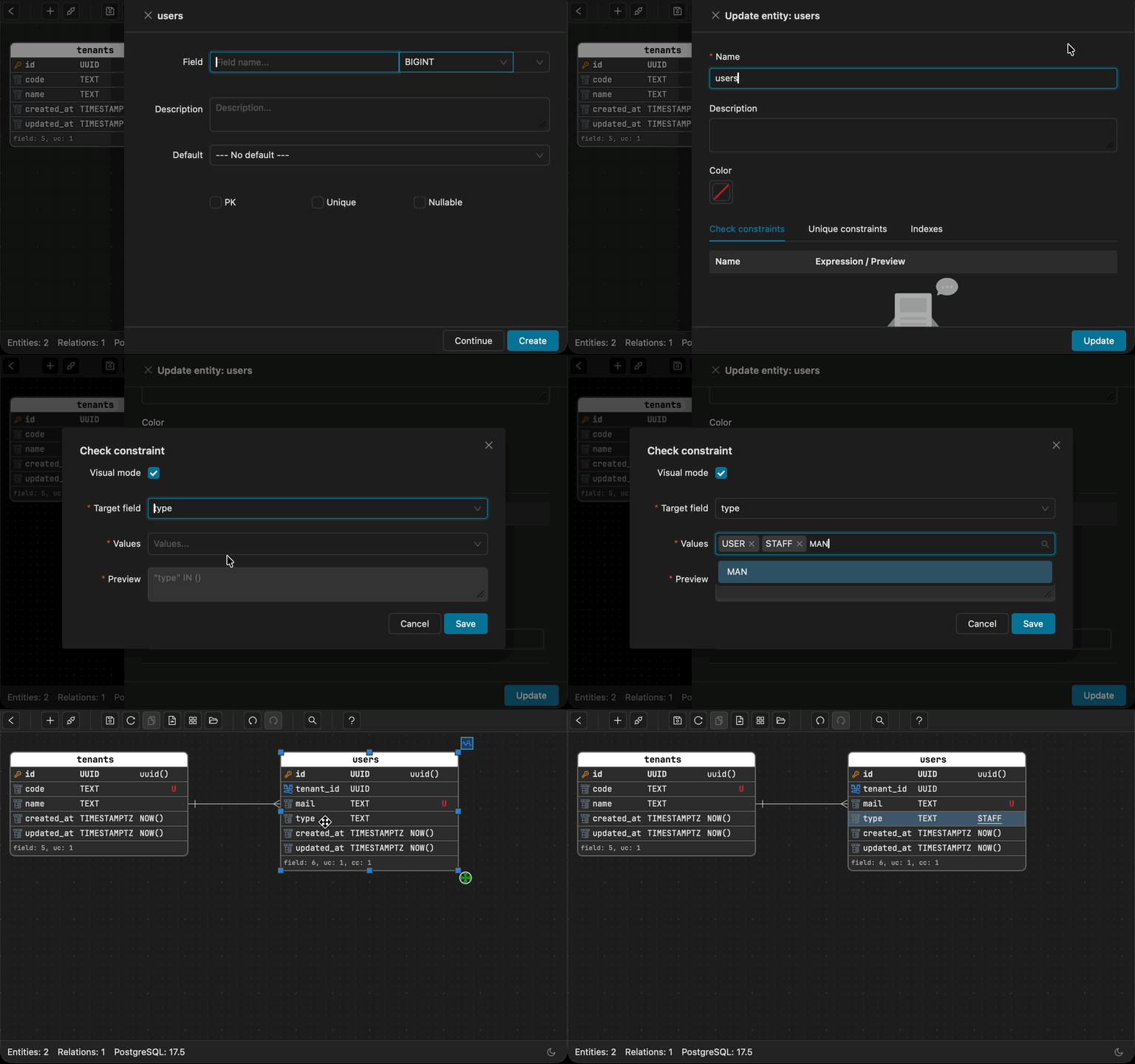
This turns the ERD into something it rarely is: a diagram that shows not just structure, but business rules. The status field doesn’t just say TEXT - it says TEXT, constrained to these values, and the values are right there.
Why this matters for domain modelling
In DDD, the goal is to make the model explicit. The code - and the schema - should read like the domain, not like an implementation detail. A status field with an IN constraint is already a domain concept encoded in SQL. The only question is whether your tooling makes it legible.
When the ERD shows constrained values, several things become easier:
Onboarding. A new engineer looking at the schema doesn’t have to grep the codebase to find valid statuses. They are in the diagram.
Communication. When a product manager asks “what are the possible order states?”, you can open the ERD and point at the field. The answer is in the schema, not in a separate document that may or may not be current.
Design. When adding a new entity that references the same domain concept, the valid values are visible at a glance. You design against the constraint, not against a guess.
Review. In a schema review, seeing an underlined default value is a prompt to ask: is this constraint complete? Should archived be in there? Is deleted still valid? The constraint becomes a conversation starter, not a hidden assumption.
The diagram should tell the whole story
Most ERD tools give you a structural view of the database. Tables, columns, types, foreign keys. That is necessary but not sufficient. A domain-driven design database schema that has been thoughtfully built for a real domain contains more information than the column list reveals - it contains the rules.
Check constraints, IN constraints in particular, are the clearest example. They encode valid states, allowed categories, enumerated types - the vocabulary of the domain - directly in the database. Schemity reads that encoding and makes it visible, with underlined values as the signal that something meaningful is behind this field.
The ERD was always hiding your domain model. Now you can read it.