There is a small, humiliating gesture every database person knows: putting a finger on the screen. You are reading a schema diagram, you find the foreign key line you care about, and you physically track it across the canvas - because the moment it crosses another line, your eyes cannot be trusted to stay on it. Two pixels of intersection, and you are following the wrong relationship into the wrong table.
This is not a niche complaint. A yEd user drawing an ERD with many entities described it exactly: “the lines are crossing and you cannot see which line goes from what entity to another entity anymore” - and what they asked for was a bended line, half a circle, at every intersection, so a crossing would stop looking like a connection. pgAdmin users filed the same pain from the other side: relationship lines that always exit the right edge of a table and “often pass behind other tables”, turning the generated diagram into something the reporter plainly called confusing. The schema was correct. The rendering made it unreadable.
And unreadable lines are not a cosmetic problem. A relationship line is the entire point of an entity-relationship diagram - it is the part that says this order belongs to that customer, and deleting the customer cascades here. If you cannot tell which line goes where, the diagram has failed at the one job a SQL diagram tool exists to do.
A crossing is not a connection
In any real schema, some crossings are unavoidable. A schema is a graph, the canvas is a plane, and past a couple dozen tables no arrangement eliminates every intersection. So the question is not how to prevent crossings - it is how to make a crossing impossible to misread.
Schemity answers it the way that yEd user begged for, but by default instead of buried in a preferences dialog: where two relationship lines cross, one hops over the other with a small arc. Your eye rides the hop and lands on the same line it was following - no finger on the screen, no re-tracing from the source table. The hop renders on the canvas while you work and survives into the SVG export, so the diagram you paste into a design doc stays as traceable as the one you drew.
The same care shows up at every turn a line makes. Where a relationship changes direction at a waypoint, it turns with a smooth rounded corner that matches the corner style of the entities themselves. That sounds decorative until you have watched your eye fly off a hard 90-degree bend on somebody else’s diagram. Corners are where tracking errors happen; rounding them keeps the eye attached.
Give every line its own identity
Hops solve the intersection. Color solves the crowd. In Schemity you can set a color per entity, and every relationship originating from that entity inherits it - so the color alone tells you where a line comes from, before you have traced a single segment. On a dense canvas this changes what tracing even means: you are no longer following a line through a knot of gray, you are following the red one. When the tenant tables are red and everything else is black, a crossing between their relationships is not just hopped - it is two visibly different lines that never had a chance of being confused.
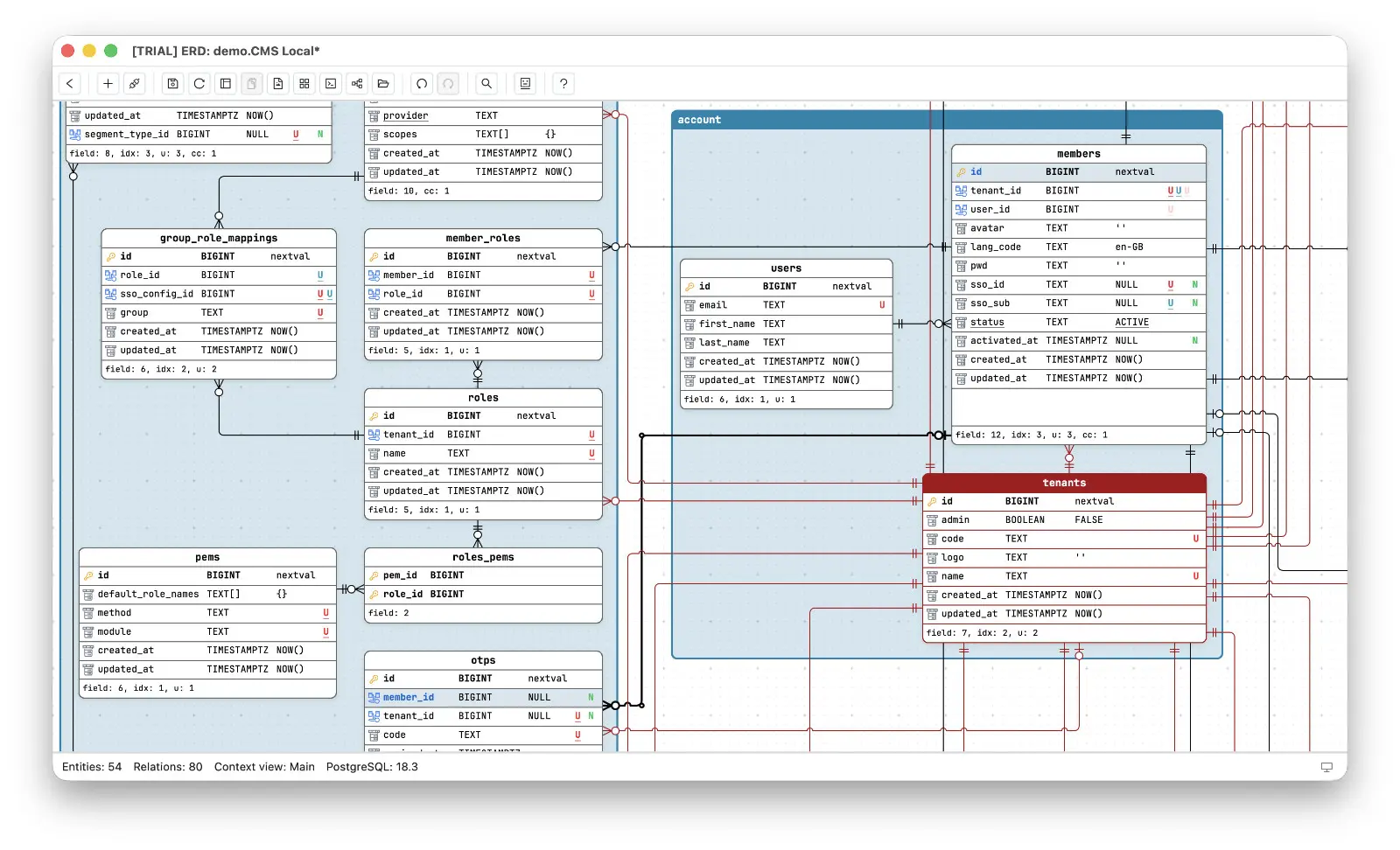
The color keeps working even when the source is nowhere in sight. Scroll deep into another region of the canvas, and a red line passing through still says tenants - you know where it comes from without following it back a single segment.
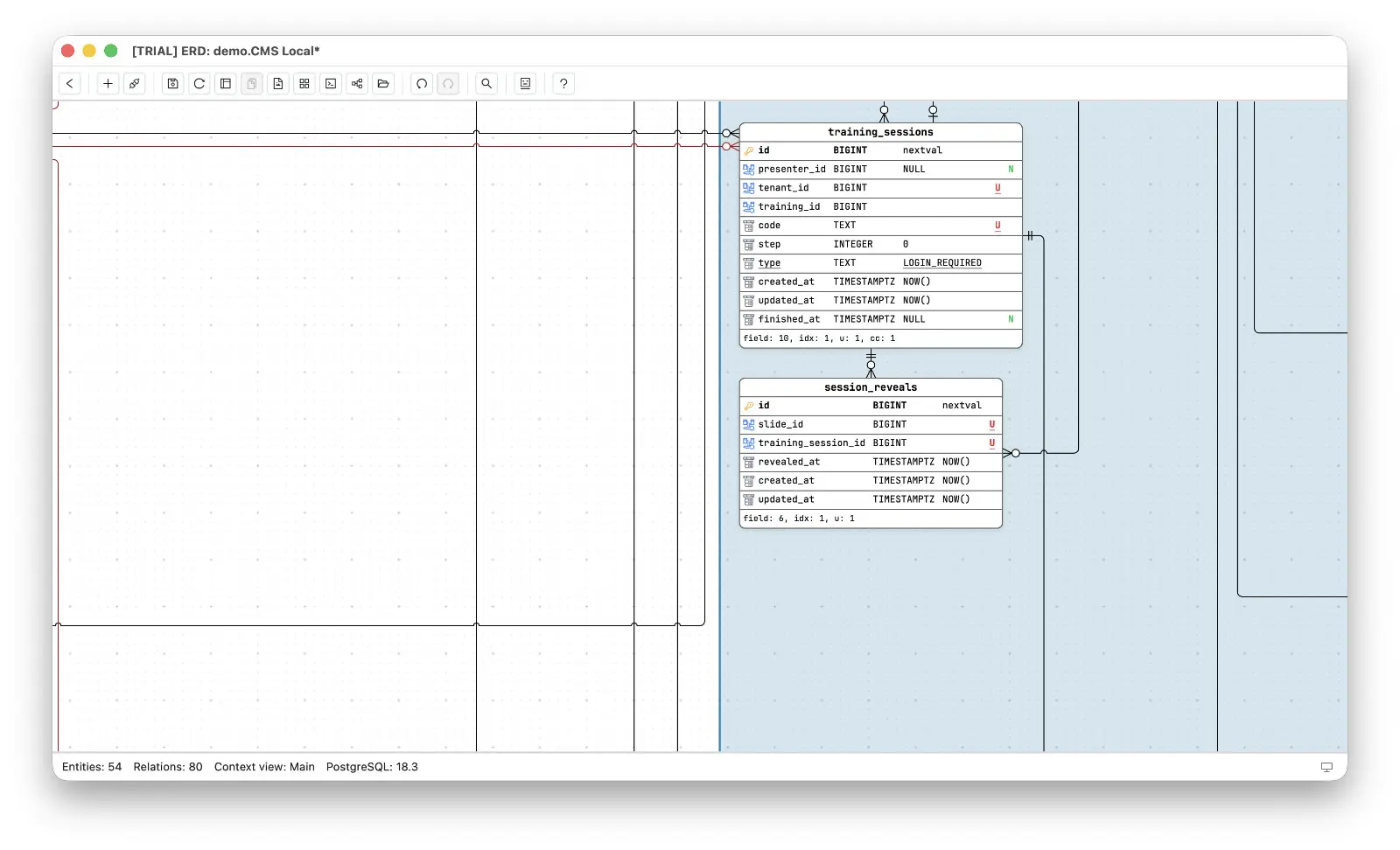
And when you need certainty rather than a strong hint, one click settles it. Click any relationship and Schemity highlights the whole line together with the exact fields it connects: the foreign key on the source entity and the primary key on the target. The question the yEd user was reduced to answering with careful zooming - which entity does this line actually go to? - becomes a highlighted path with both endpoints lit. No tracing at all. The diagram answers for you.
And when the line arrives, it should tell you what it means. Every relationship end in Schemity carries clear crow’s foot notation, with cardinality, ON DELETE, and ON UPDATE all configurable - so the line you just traced answers the next question too. If you have ever suspected you are reading those fork-shaped endings wrong, you are in good company; the notation rewards being learned once and then rendered consistently.
Route the line the way you would explain it
The pgAdmin complaint was not only about crossings - it was about routing you cannot control. Lines that all exit one edge, lines that tunnel behind tables, lines whose path you would never have chosen. A tool for reading schemas can get away with that. An ERD tool for software engineers who design schemas cannot, because the route of a line is part of the explanation: this relationship goes around the cluster, not through it.
Schemity makes the route yours. Every relationship line can be reshaped freely with smart custom waypoints - drop a waypoint to steer the line around an obstacle, and smart snapping keeps the segments aligned while you drag. Lines leave their source entity at a right angle, so even a heavily reshaped diagram keeps a disciplined, orthogonal look instead of diagonal spaghetti. The result reads like a subway map: deliberate paths, clean turns, hops at the crossings.
Fewer lines to fight in the first place
The best crossing is the one that never happens, and that is an arrangement problem. Legends group related entities into named, colored regions you can lock and move as one block, which naturally pulls connected tables together and shortens their relationships. And when one diagram simply has too many concerns on it, a context view carves out a focused subset - most of the line noise in a full schema belongs to relationships you are not currently thinking about, and a focused view drops them without touching the schema itself.
None of this requires a cloud account or a rendering server. Schemity is an offline ERD tool - a lightweight desktop app where the diagram, hops and waypoints and colors included, lives in a plain local JSON file on your machine. Line readability is exactly the kind of layout work that is too expensive to lose to a tool that forgets it, and it deserves a canvas where arranging things well feels like part of the design work, not a fight against it.
A diagram you can only read with a finger on the screen is a diagram that has stopped doing its job. Every line should be followable at a glance - over every crossing, around every corner, all the way to the table it points at. That is not polish. That is the product.